What can you do with a Flipper Zero? Keeping Your Business Safe
In this article:
- What Is the Flipper Zero?
- NFC, RFID, Infrared, Sub GHz Radio, and Beyond: What the Flipper Zero Can Actually Do
- What the Flipper Zero Can Not Do: Understanding Its Real Limitations
- How the Flipper Zero Became a Legal Lightning Rod
- Why the Flipper Zero Shows Up in Business Environments
- What Security References and Community Discussions Reveal About Real Risk
- Building a Flipper Zero Policy for Your Workplace
An employee walks into your office with a small handheld device the size of a deck of cards. They bought it online for around $200 and want to test whether it can read the badge readers near your conference room doors.
No one stops them. Your acceptable use policy does not cover this type of device, and half the room is not sure what it actually does.
For small and midsize businesses, that gap is the real risk. This article breaks down the Flipper Zero’s capabilities, where they end, and what the legal landscape looks like for similar devices. It also covers the concrete steps IT leaders can take before one of these flipper devices walks through your front door.
What Is the Flipper Zero?
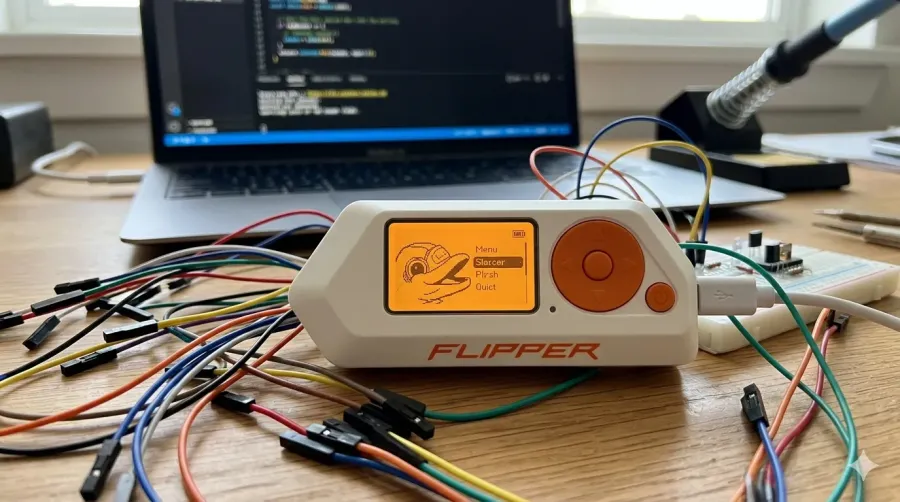
The Flipper Zero is a commercially sold, open-source hardware multi-tool built for security professionals, penetration testers, and technically curious hobbyists. It ships in retail packaging with documentation and a company behind it. This is not a black-market device, and it is not a movie prop.
It runs on a low-power microcontroller (MCU) with onboard flash storage and a small LCD display for on-device navigation. A microSD card slot supports up to 256 GB of storage for saving remote codes, signal databases, NFC cards, and other data. That design makes it fully self-contained: no laptop required, no secondary application needed to operate its core functions.
The device charges and syncs over USB Type C. A companion mobile app manages firmware updates and file transfers when needed.
The Flipper’s reputation frequently exceeds its stock capability. When the device appears in mainstream cybersecurity headlines for allegedly crashing iPhones or compromising ATMs, those claims rarely survive technical scrutiny and often lack concrete evidence. A South Dakota Fusion Center police bulletin once flagged the device as a potential criminal tool, but the assessment conflated the Flipper Zero’s capabilities with scenarios that require substantially more sophisticated equipment. Any proportionate risk assessment for your business starts with what the device actually does, not what viral videos claim.
NFC, RFID, Infrared, Sub GHz Radio, and Beyond: What the Flipper Zero Can Actually Do
The Flipper combines several radio and hardware interfaces into one portable device. Each targets a different class of digital systems, and all have direct relevance to business environments.
Sub GHz radio
The onboard CC1101 chip can decode 89 sub ghz radio protocols, including amplitude-shift keying (ASK) and other modulation schemes. This lets the device read, record, and transmit signals from older garage doors, gate openers, weather stations, and fixed-code key fobs. Engineers can also use the “Read RAW” function to troubleshoot wireless interferences in the sub GHz spectrum.
RFID and NFC
The Flipper reads and emulates low-frequency Radio Frequency Identification (RFID) access cards and RFID chips at 125 kHz, the badges common in office door readers. Its Near Field Communication (NFC) module handles higher-frequency 13.56 MHz tags and NFC cards, and can trigger intents on some Android devices. The device can also store contact information on NFC cards, functioning as digital business cards.
Infrared
An onboard IR transceiver captures infrared signals from televisions, projectors, HVAC controllers, air conditioners, and other office equipment, then replays them on demand. A Flipper left in a conference room can silently catalog every AV and climate radio signal in range. The Flipper Zero community actively contributes to the IR Remote database, regularly updating it with new signals for various electronic devices.
iButton
The stock device reads and emulates contact-based Dallas/Maxim 1-Wire credential keys used in older facility access control systems.
GPIO with UART and SPI
Hardware pins expose General-Purpose Input/Output (GPIO), Universal Asynchronous Receiver-Transmitter (UART), and Serial Peripheral Interface (SPI) connections. The device can also function as a USB converter for UART, SPI, and I2C protocols, allowing direct interaction with Internet of Things (IoT) device circuit boards. This makes the Flipper a powerful tool for embedded security assessments on building automation or connected equipment.
BadUSB
When connected via USB to a workstation, BadUSB devices like the Flipper impersonate a keyboard (a Human Interface Device) and execute pre-programmed keystroke sequences without any user input or system alert. No permission prompt appears on screen. The device can also emulate a wireless keyboard or mouse for remote controls of media playback and other devices.
Wi-Fi
The stock Flipper Zero ships without a built-in Wi Fi radio, but an optional add-on module enables wireless signals capture and network traffic analysis. With the Wi Fi developer board attached, the Flipper gains capabilities for wireless network reconnaissance that the stock unit lacks.
Bluetooth Low Energy
The Flipper includes Bluetooth Low Energy (BLE) capability for interfacing with personal devices running iOS and Android. BLE spam attacks using the Flipper can potentially disrupt mobile device connections and nearby systems, making Bluetooth Low Energy a relevant consideration for business security measures.
These capabilities make the Flipper most relevant to organizations still running legacy access control systems, unpatched IoT devices, or workstations without USB device control policies in place.
What the Flipper Zero Can Not Do: Understanding Its Real Limitations
The limitations profile matters as much as the capabilities list. Here is where the stock device stops:
Rolling codes block replay attacks. Modern garage doors, vehicle key fobs, and access controls use rolling codes protocols that generate a new code with each use. A captured signal is useless on replay, which is why the Flipper cannot reliably open modern garage doors or vehicle locks despite viral claims.
Encrypted access cards resist cloning. Cards using MIFARE DESFire, iCLASS SE, or similar encrypted standards require substantially more than the Flipper’s read-and-emulate workflow to compromise. Modern access cards with encryption are effectively outside the device’s practical attack surface.
No cellular radio. The device cannot interact with LTE, 5G, or GSM wireless signals in any capacity.
Close-proximity only. NFC range is measured in centimeters. Sub GHz range under ideal conditions is a matter of meters, not building-to-building distances.
No credit card cloning. Despite viral claims, the Flipper cannot clone modern EMV chip payment cards. EMV terminals use cryptographic challenge-response protocols that the device cannot replicate.
The key takeaway for IT leaders: the Flipper Zero is most dangerous to organizations still running unencrypted legacy physical access controls or leaving workstations unattended without USB device controls. Modern, managed infrastructure with current security measures narrows the threat surface considerably.
How the Flipper Zero Became a Legal Lightning Rod
Owning a Flipper Zero is legal in the United States. No federal law or state laws prohibit possession. The legal exposure comes entirely from how the device is used, not from having it.
The Computer Fraud and Abuse Act (18 U.S.C. section 1030) governs unauthorized computer access and carries federal penalties regardless of which tool an attacker uses. Unauthorized interception of electronic communications and credential cloning without explicit permission create separate federal exposure and criminal liability. Criminal activity using the device is prosecuted based on the act, not the tool. The device itself is legally neutral; the act defines the crime.
Two international restrictions have drawn significant attention. Canada announced plans to ban the Flipper Zero in 2024 following concerns about a surge in vehicle theft. Security researchers pointed out that modern EMV chip terminals sit outside the device’s actual attack surface. Brazil’s telecommunications regulator, ANATEL, took the more definitive step of seizing Flipper Zero shipments and refusing device certification under wireless device regulations.
The Electronic Frontier Foundation has argued that banning security research tools like the Flipper Zero sets a harmful precedent for legitimate uses in security work.
For U.S. businesses, the practical framing is direct: an employee who brings a Flipper to the office and probes systems without authorization faces real federal law consequences. Your organization faces its own exposure if that activity goes undetected or is handled inconsistently. For a full breakdown of the legal landscape, including the FCC’s position and how federal law applies, see our guide to whether the Flipper Zero is banned in the U.S.
Why the Flipper Zero Shows Up in Business Environments
Three distinct groups bring flipper devices into workplaces, each with a different risk profile:
Security professionals and red teamers carry the Flipper as a standard audit tool for testing RFID badge readers, NFC terminals, and IoT devices hardening. When properly scoped and authorized, this is one of its legitimate uses and a common security research use case.
Hobbyist employees own one at home and bring it in to show colleagues or test office equipment. Some use the device for personal devices management like consolidating remote controls onto an SD card, programming it as a Nintendo Switch Amiibo emulator or video game module, automating PC maintenance tasks, or even locating a lost pet tracker signal. Intent is usually harmless. The outcome, without a written device policy in place, is not predictable.
Targeted adversaries use it to probe your perimeter. The targets are predictable: credential capture near a door reader, sub ghz replay against IoT devices, or a BadUSB payload on an unattended workstation. The device fits in a shirt pocket and raises no immediate alarm when no hardware policy exists.
Chicago-area businesses that rely on comprehensive IT support typically have device policies, monitoring, and physical access control reviews already running. That groundwork makes the third scenario significantly harder to execute undetected.
What Security References and Community Discussions Reveal About Real Risk
Reputable security researcher sources consistently position the Flipper as a legacy-system audit tool. Its most reliable attack paths target unencrypted infrastructure, not modern enterprise-grade access controls or payment terminals. That framing matters for how you allocate resources.
Three patterns emerge consistently from security community discussions and technical reviews:
Viral claims about cloning credit cards, crashing iPhones, or compromising ATMs largely reflect short-lived software bugs or third party firmware experiments, not out-of-the-box capability from the retail device.
Third party firmware and custom firmware change the threat profile significantly. Community-built firmware removes sub ghz radio frequency restrictions and adds capabilities not present in the stock build, including expanded radio protocols support. A modified Flipper is a meaningfully different device than the retail unit.
You cannot tell from looking at a device which firmware is installed. That uncertainty is the practical risk, not the stock spec sheet.
Android devices NFC interactions deserve specific attention in business environments. Some older Android versions responded to crafted NFC intents in unintended ways; modern, patched devices have addressed the most severe variants. Adjust system settings on managed mobile device fleets to restrict NFC intent handling where possible. This remains relevant in organizations where employees run unmanaged personal Android devices or where mobile device update cycles are slow.
Assume any Flipper you encounter may be running custom firmware. Design your policies and access controls around that expanded capability set, not just the stock device behavior.
Building a Flipper Zero Policy for Your Workplace
A proportionate response addresses the Flipper Zero without being Flipper-specific. The goal is a framework that governs this class of devices and outlasts any single hardware product on the market. These are practical steps any organization can implement.
Update your acceptable use policy. Address radio frequency tools, NFC and RFID scanners, and USB hacking devices by category. The Flipper Zero is today’s example; a technology-agnostic policy covers tomorrow’s equivalent and similar devices without requiring a full rewrite.
Audit your physical access control. If your office uses 125 kHz RFID badges, the stock Flipper reads and emulates those credentials. Plan an upgrade path to encrypted access cards paired with multi-factor physical access controls to protect sensitive data and physical access points.
Enforce USB device control. Deploy policies that block Human Interface Device (HID) spoofing on workstations, or physically disable unused USB ports on shared machines. This closes the BadUSB attack vector at the endpoint level and prevents data exfiltration through BadUSB devices.
Inventory and segment IoT devices. Confirm three things about your IoT environment:
- IoT devices sit on an isolated virtual local area network (VLAN) with no network traffic path to sensitive systems
- Sub GHz remote controls for building systems use encrypted rolling codes
- Infrared-accessible equipment does not control sensitive building or IT functions
Define an authorization workflow for security tools. IT staff who need to use a Flipper for legitimate security research assessments require documented scope, explicit permission, and management sign-off before any testing begins. An undocumented assessment is indistinguishable from unauthorized access.
Chicagoland organizations that work with a managed IT services provider get these access controls as part of a maintained security program. Policy does not need to start from scratch every time a new device appears on the market.
Once your access control systems, endpoint policies, and IoT segmentation are in place, a Flipper Zero sighting becomes a manageable policy conversation. Not an undiscovered breach.
LeadingIT provides managed IT and cybersecurity services to businesses across the Chicagoland area, including policy development, endpoint protection, network segmentation, and physical access control advisory. We work with organizations from 25 to 250 employees who need a maintained security posture without building an internal security team from the ground up.
Contact our Chicagoland IT support team or call 815-788-6041 to talk through your environment. Or schedule a free assessment to see exactly where your access control systems, endpoint policies, and IoT segmentation stand.


